Workspace Windows
The Web Search Window
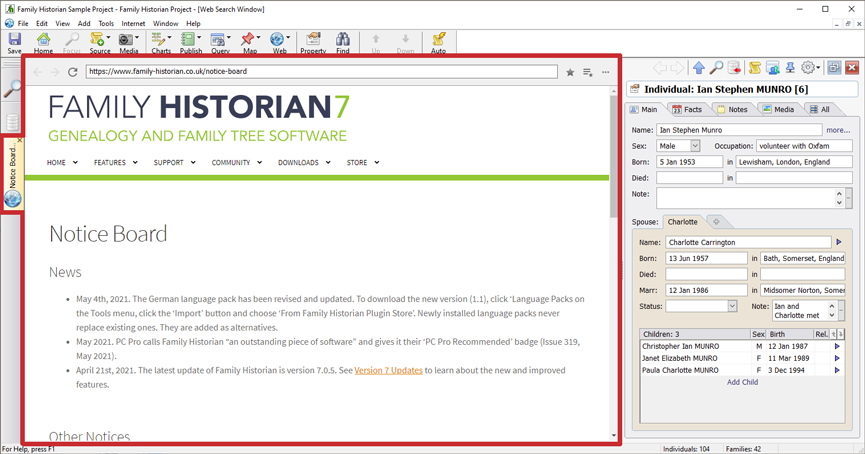
Web Search Window (marked in red) with Property Box docked to the right
The Web Search Window is opened by clicking on the Web Search Window
button  on the main application toolbar. When you click on this button, a
dropdown menu appears. The first menu item is 'Web Search Window'.
Click on this to open a new Web Search Window. You can also open a
Web Search Window by clicking on Open Web Search Window on
the Internet menu. By default,
the Web Search Window is also opened or updated if you click on any
Internet Data Matching hints on the Focus
Window, or if you do a search in the Search the Internet dialog.
on the main application toolbar. When you click on this button, a
dropdown menu appears. The first menu item is 'Web Search Window'.
Click on this to open a new Web Search Window. You can also open a
Web Search Window by clicking on Open Web Search Window on
the Internet menu. By default,
the Web Search Window is also opened or updated if you click on any
Internet Data Matching hints on the Focus
Window, or if you do a search in the Search the Internet dialog.
The Web Search Window displays a web browser and an address toolbar. It is used primarily, as the name suggests, for searching the Internet for genealogy records. See the Web Search Toolbar for details about the Web Search Window toolbar.
If you wish, you can always choose to use an external Web Browser instead of the Web Search Window (this is an option in the Internet Data Matches tab of Preferences, and also an option on the Search the Internet dialog). Although you are never required to use the Web Search Window to view web pages, there are a number of benefits of doing so:
- If you want to drag-and-drop text and pictures from a web page into the Property Box, and/or into the Automatic Source Citation Pane, this is much more likely to work if you are viewing the web page in the Web Search window, than if you are using an external browser (note: if drag-and-drop does not work, you may still be able to copy and paste either text or pictures).
- By using the Web Search window you can arrange the layout of the Property Box and the Automatic Source Citation, so that they are conveniently docked at the side, and at the top of the window, respectively. You cannot dock either of these windows next to an external web browser.
- You can save bookmarks with other recorded genealogy sites in the Search the Internet Dialog.