Workspace Windows
The Web Search Window
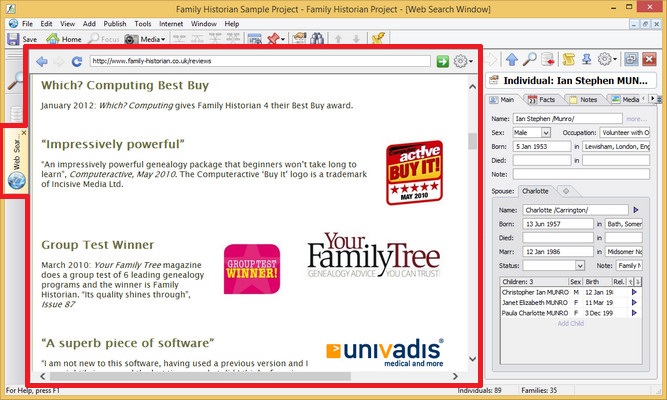
Web Search Window (marked in red) with Property Box docked to the right
The Web Search window is a web browser within a window. You can open it by clicking on Open Web Search Window on the Internet menu. By default, the Web Search Window is also opened if you click on any Internet Data Matching hints on the Focus Window, or if you do a search in the Internet Search dialog.
See the Web Search Toolbar for details about the toolbar (at the top of the window - below ordinary application toolbars).
If you wish, you can always choose to use an external Web Browser
instead of the Web Search Window. The Web Search Window has its
own menu, which is displayed when you click on the menu button  in the top-right corner. The options are:
| Search Genealogy Sites | Opens the Internet Search Dialog. |
|---|---|
| Open in External Browser | Opens the current web page in an external browser. |
| Bookmark this page |
Creates a bookmark for the current page. Bookmarks can be used, viewed, edited and deleted in the Internet Search Dialog (see above). |
| Copy Web Address | Copy the current web address to the clipboard |
| Default Text Size |
Menu with options to set the default browser text size. Note: This option will only have any effect on web pages which use the default browser text size |
Although you are never required to use the Web Search Window to view web pages, there are a number of benefits of doing so - such as:
- If you want to drag-and-drop text and pictures from a web page into the Property Box, and/or into the Automatic Source Citation Pane, this is much more likely to work if you are viewing the web page in the Web Search window, than if you are using an external browser.
- By using the Web Search window you can arrange the layout of the Property Box and the Automatic Source Citation, so that they are conveniently docked at the side, and at the top of the window, respectively. You cannot dock either of these windows next to an external web browser.
- You can save bookmarks with other recorded genealogy sites in the Internet Search Dialog.