Fact Types Dialog
Fact Sets Dialog
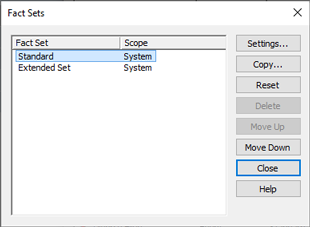
Fact Sets Dialog
Fact sets are collections of fact definitions. This dialog lists all the fact sets currently defined and shows their ranking in order of priority. The ranking of any two fact sets only matters, and only makes any difference to anything, if different fact sets contain fact definitions which share the same name. See Work with Fact Sets for more on what fact sets are, what information they contain and why their ranking matters.
Use the and buttons to change the relative ranking of fact sets.
It is important to understand that any changes you may make to fact sets, will not affect the actual data stored in your projects. But they may well affect how that data is presented in reports and elsewhere. Moreover, any changes to system level fact sets will affect all projects on your computer. And finally, unlike ordinary changes to data within a project, changes to fact sets cannot be undone. So always be careful before making changes to fact sets. If you are unsure about deleting a custom fact set, or resetting the standard fact set, you might want to consider exporting a copy of it first, as a backup.
For more information see Creating and Deleting Fact Sets, and Importing and Exporting Fact Sets.
Buttons
| Settings | Settings are editable for custom fact sets only. You can change the name of the fact set. You can also change whether it is system level or project level by ticking or unticking the "Current project only" check box. Bear in mind that a project level fact set ('Current project only' is ticked) is always ranked higher than system level fact sets, and has higher priority. |
|---|---|
| Copy | This option creates a copy of the selected fact set (custom or standard). The copy is always a custom fact set. You will be required to give it a unique name. |
| Reset | Only two fact sets can be reset: the Standard fact set and the Extended Set. Be careful before resetting a fact set as this cannot be undone - and because the affected fact sets are system level fact sets, this change will affect all the projects on your computer (see note above). Any changes you have made to fact definitions within these fact sets will be discarded, and the fact set will revert to its default state. |
| Delete | Only custom fact sets can be deleted. Be careful before deleting any fact sets as this cannot be undone and, if they are system level fact sets, the change will affect all projects on your computer (see note above). |
| Move Up | Moves the selected fact set up the rankings. Note that
project level fact sets always come higher up the rankings than
system level fact sets, so you cannot move a system level fact set
up above a project level one. |
| Move Down | Moves the selected fact set down the rankings. Note that project level fact sets always come higher up the rankings than system level fact sets, so you cannot move a project level fact set down below a system level one. |