Edit Role - Language Variant Dialog
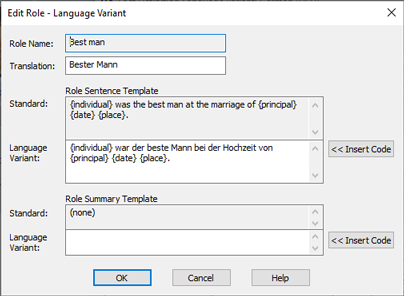
Edit Role Language Variant Dialog
Buttons
| << Insert Code |
Insert a sentence template codes into the appropriate sentence
template. See Sentence
Template Codes for more information. |
Fields and Buttons
| Role Name |
Read only. This identifies the role in the default
language. It is never translated.
|
| Translation |
This is the translation of the role name
|
| Standard Role Sentence Template |
Read only. Sentence template for
the specified role, for this fact type, in the default language
(usually English). This sentence template is defined in the
Edit Role Dialog. |
| Language Variant Role Sentence Template |
Translated role sentence template. |
| Standard Role Summary Template |
Read only. Some reports will use a summary template if
available (if not, they will use the sentence template
instead). This is the default language version. It is
defined (if at all) in the Edit Role - Advanced
Features Dialog (see the discussion of the Advanced button in the Edit
Role Dialog). |
| Language Variant Role Summary Template |
Optional translation of the Role Summary Template.
|