Property Box
Parents Window
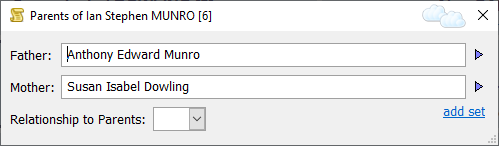
Parents Window
The Parents Window is a floating window and satellite of the Property Box. That is to say, it stays in sync with the currently select Individual record in the Property Box, and shows the parents of that Individual. The Parents Window closes when the Property Box closes, or if the Property Box displays a record which is not an Individual record.
To open the Parents Window, click on the Show Parents Window button  on the Property Box toolbar, when viewing an Individual record in the
Property Box.
on the Property Box toolbar, when viewing an Individual record in the
Property Box.
In Family Historian, each person can have any number of sets of parents. To add an additional set of parents, click on the 'add set' link in the bottom right corner. When you do this, the Parents Window will change to look like this:
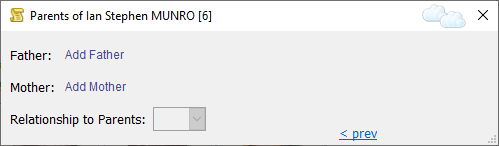
Parents Window (adding a second set of parents)
Click on the links ("Add Father" and "Add Mother") to add parents. You can also specify the person's relationship to their parents using the Relationship to Parents field. When the second set of parents have been added, the Parents Window will look like this:
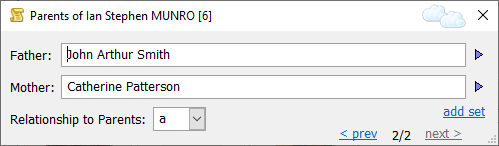
Parents Window (with two sets of parents)
In the example, John Arthur Smith and Catherine Patterson are recorded as the adoptive parents of Ian Munro (the second set of two). Use the '<prev' and 'next>' links in the bottom-right corner to move between different sets of parents.
Immediately after adding a set of parents, you can click on Undo on
the Edit menu to undo the action if you wish. If you
want to remove a set of parents at any other time, select the 'child'
person (that is, 'child' in the 'offspring' sense - a person who might
be an adult) and use the Unlink from command on the Edit
menu (this is assuming that you want to remove the relationship, but do
not want to delete any records for anyone).
Drag-and-Drop
The Parents Window supports drag-and-drop. If you see in a web page that a person's mother was "Martha Clark", one quick and easy way of adding this information could be to drag the text "Martha Clark", from the web page, onto the "Add Mother" link. See Drag-and-Drop for more details.