More Dialog Boxes...
Find Dialog
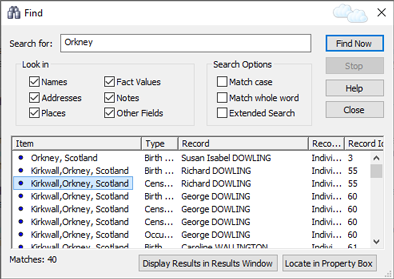
Find Dialog
The Find Dialog is used to search for text throughout the current
project. It can be accessed by clicking the Find button  on the
main application toolbar, or by clicking Find on the Edit
menu. It is a floating window,
which means that you do not have to close it before you can do other
things. Indeed it is often useful to leave it open - if, for
example, you wish to inspect each match found in turn, in the Property
Box.
on the
main application toolbar, or by clicking Find on the Edit
menu. It is a floating window,
which means that you do not have to close it before you can do other
things. Indeed it is often useful to leave it open - if, for
example, you wish to inspect each match found in turn, in the Property
Box.
Fields
| Search for | Specify the text to search for |
|---|---|
| Names | Search for text in Name fields. Name
fields are primarily used to store names in Individual
records, but can also be used in Source
records and elsewhere. They are special fields that allow a
person's surname to be distinguished from his or her other names
by putting slash characters around the surname. The slash
characters are only needed (and only shown) if the person's
surname is not the last word in their name. |
| Addresses | Search for text in Address fields. Address fields are used to store addresses for facts (events and attributes), and also for repository records, and in other contexts. They are special fields that allow addresses to be presented in a number of different ways in different contexts. |
| Places | Search for text in place fields. Place fields are used to store place information (similar to addresses but less specific) for facts (that is, events and attributes), and also for some Source records, some source citations, Repository records, and in other contexts. They are special fields with numerous features. They allow place information to be entered quickly and easily, and make it possible for Family Historian to mark places on maps, and to allow information to be recorded about places, amongst other things. |
| Fact Values | In Family Historian, a fact is the term used to refer
to an event or attribute. The
difference between an event (such as birth) and an
attribute (such as occupation) is that the latter only
has a value. For example, a person's occupation might be farmer.
The value of an attribute is what is meant by fact values. |
| Notes | Family Historian allows notes to be recorded about a great many
things. You can record notes about Individuals, Marriages,
Facts, Places, Pictures and other media, Sources, Source
Citations, Repositories, and much more. You can even have
Note records. Ticking this option allows all such notes to
be searched. |
| Other Fields | Tick this option to allow other field types to be included in
searches. |
| Match case |
Tick this option if you want your search to be case-specific. |
| Match whole word |
Tick this option if you want the search to match whole words
only. |
| Extended Search |
In a normal search, Family Historian will search through all
data records - not just Individual and Family records, but also
Place records, Media records, Note records, Source records,
Repository records and more. However, it won't normally
search through Source Template records because these
store metadata - that is, data about data - and are not
usually of interest for search purposes. However, if you
want Source Template records to be included, tick this option. |