Fact Types Dialog
Fact Definition - Advanced Features Dialog
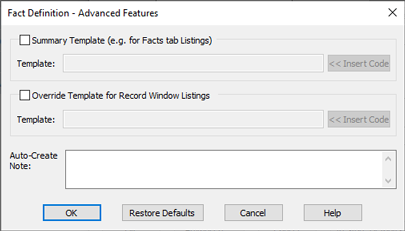
Fact Definition - Advanced Features Dialog
Fields and Buttons
| Summary Template | |
|---|---|
| Override Template for Records Window Listings |
Tick this box and enter a custom template in the Template field if you want non-default text displayed in the Records Window for facts of this type. Click on the button to insert Sentence Template Codes into the template. |
| Auto-Create Note |
This optional field is rarely used but is occasionally useful. Some genealogists have their own systems for maintaining data about any given fact and like to make use of the Note field to record extra values about a fact. For example, suppose you have a filing system for recording physical items associated with given events and attributes (photographs, invitations, etc) and you have a coding system which requires you to assign a unique identifier to any given fact, you could record this identifier in a note attached to each fact, using the label 'Fact Id:'. If you are always going to have this in any note associated with the relevant fact, you can save typing by using an so that the note is automatically created, with the required label, whenever any instance of this fact is created. This option only affects what happens when an instance of the given fact is created. It has no effect thereafter; so you can modify and edit auto-created notes like any other note. |