The Family Historian API
Understanding the Data Structure
Information is stored in Family Historian using records. There are 6 main record types:
- Individuals
- Families
- Sources
- Repositories
- Notes
- Multimedia
These all inter-relate by using data fields to link the records together. There is an example of this in the Sample Create a Family Script. The diagram below shows some of the ways which records can be linked together to store your family history information.
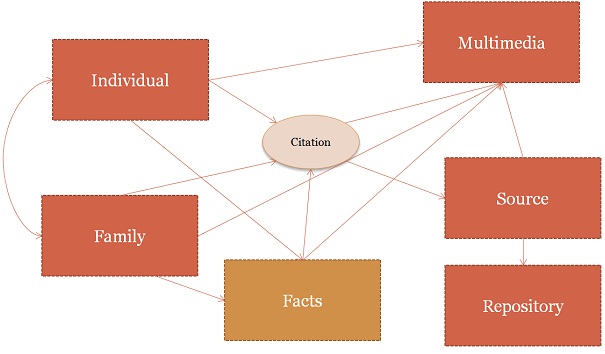
Facts are included on the diagram although they are not in fact held as records in their own right. Although citations are also not records in their own right, they are used to connect many of the other records to sources, so are included to make the relationships clearer.
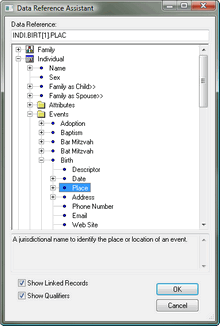
Each record will have one or (more commonly) more fields, which may also contain additional fields as subfields (subfields in turn can contain more subfields, indefinitely). The easiest way to see this is to look at a tree of Data References. One such tree can be viewed in the Columns tab of the Query Window on the left side. You can also view the tree in the Data Reference Assistant dialog box, which can be accessed by clicking Insert Data Reference on the the Plugin Editor Edit menu.
In the example to the left, the tree has been opened on the Individual record and the event birth selected, and within it the Place field. This has resulted in the the data reference INDI.BIRT[1].PLAC being generated (at the top of the window). To learn more about data references, see Understanding Data References. It should be noted that the yellow folder icons in the data reference prompts are not actually fields, but simply a convenient way of grouping related fields together, to make them easier to find. In the example above the word 'event' does not appear in the data reference.
When you press the '+' icon on the data reference helper, it will expand to show children of the field or record above.
When working with Item Pointers in Lua, moving around the data may well involve moving through records or within the fields of a record. This will involve the use of the Move... methods for the Item pointer. The MoveTo method is particularly useful when combined with data references, as you can take a "shortcut" to other records using Data References; so for example to access the record for the Father, you can use the Data Reference "~.FAMC>HUSB>". The first '>', linking the two tags, shows that you are navigating across records - in the example, you are navigating from an Individual to their family as child, and then (implied by the final '>') to the record for the husband of that family.
piStart = fhNewItemPtr()
piFather = fhNewItemPtr()

piStart:MoveToFirstRecord("INDI")
piFather:MoveTo(piStart ,"~.FAMC>HUSB>")